
What’s new with SystemOne
Updates
you’ll like


Including travel
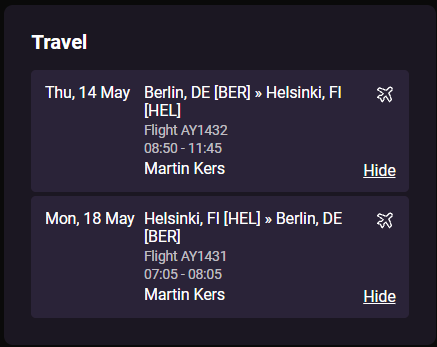
Agents and advancers can now choose to display the show-related travel arrangements like flights and train arrival and departure information to the promoter.
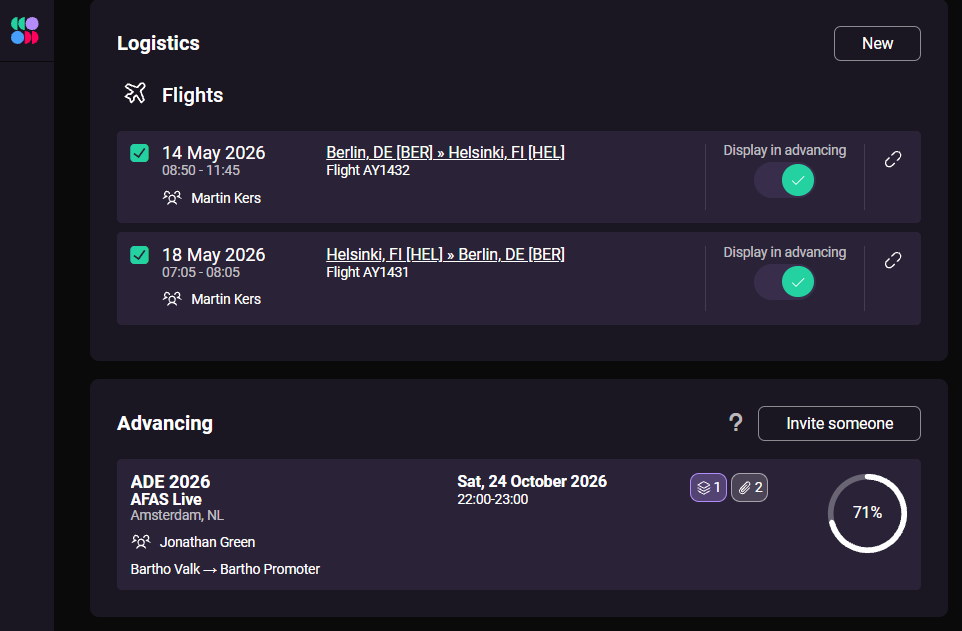
Now you can choose which travel information to display in advancing, and it will be visible in a travel panel in the advancing session. This gives the promoter instant insight into the arrival and departure of all artists and crew.
Promoter can change data afterwards
In our previous version, the provided data could not be changed once it was checked & approved. With promoters often needing to make last-minute changes, this wasn’t ideal for how advancing really works.
With the latest update, the promoter can make changes and resubmit their entries, even after their previously provided data was accepted by the agency.
Smoother collaboration throughout the advancing session ✌️
Better chat experience
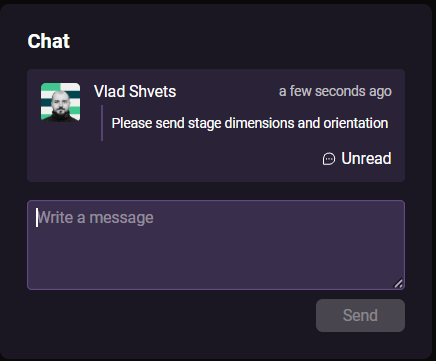
We’ve moved the advancing chat into its own panel and given it an important place on the main view of the advancing session. Unread messages also pop up in the bottom-right corner.
Before, conversations between the promoters and agents could become hard to follow because messages got lost in the general activity stream.
Progress tracker
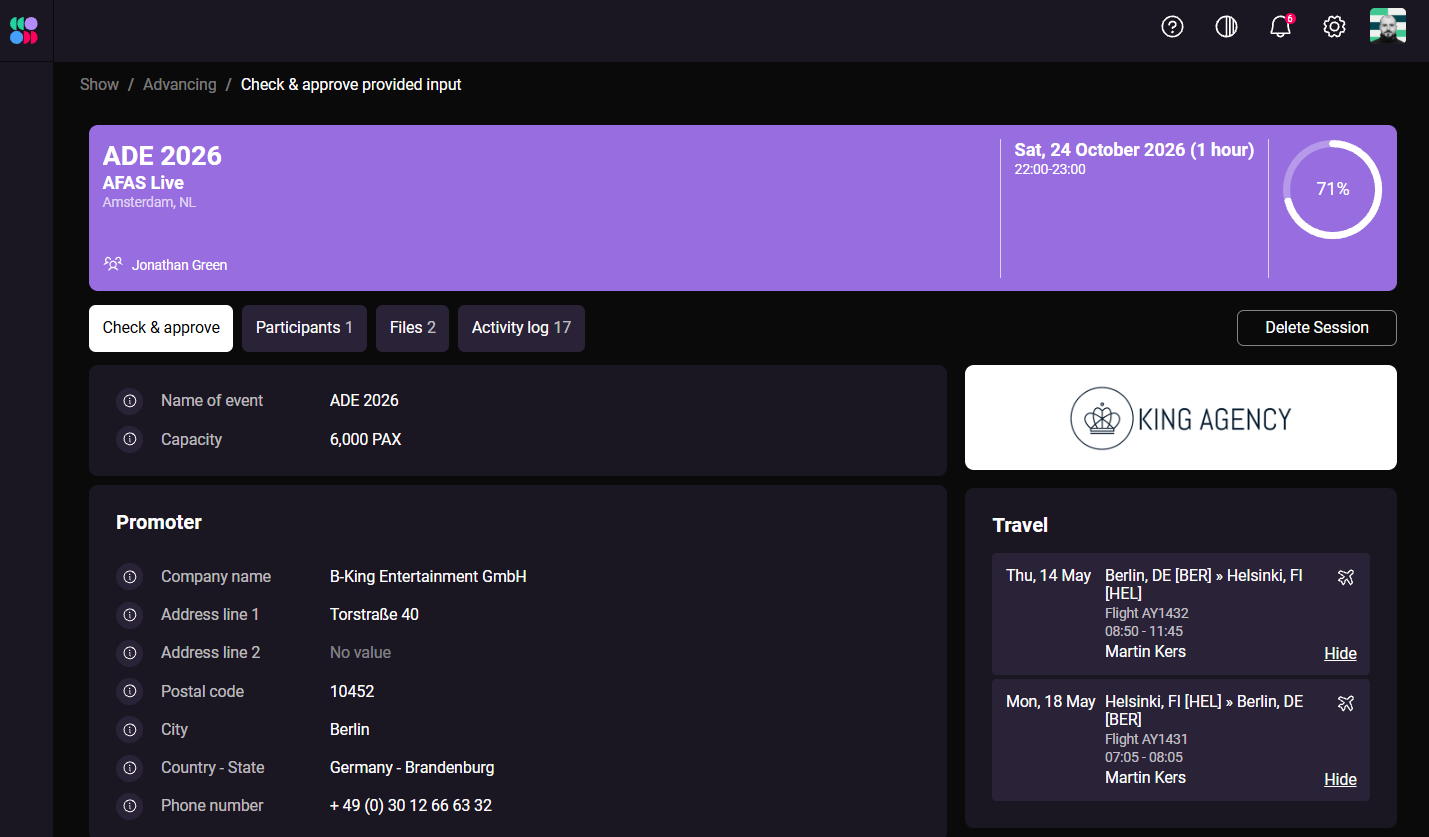
New feature! Want to know how far along the advancing session is? The progress meter moves forward as more information is successfully provided.
Restructured interface
The advancing session has many different groups of info, like participants, files you can upload, and an activity log. But the most important part is the form where information can be checked & feedback provided.
As we’re also adding more features, like travel itinerary information, we’ve decided to clean up this interface and move some secondary information into its own views.
Clarity and efficiency are top of mind in this view so each advancing session runs smoothly.
As part of our ongoing efforts to make SystemOne pretty and easy to use, we’ve made several improvements to our desktop platform.
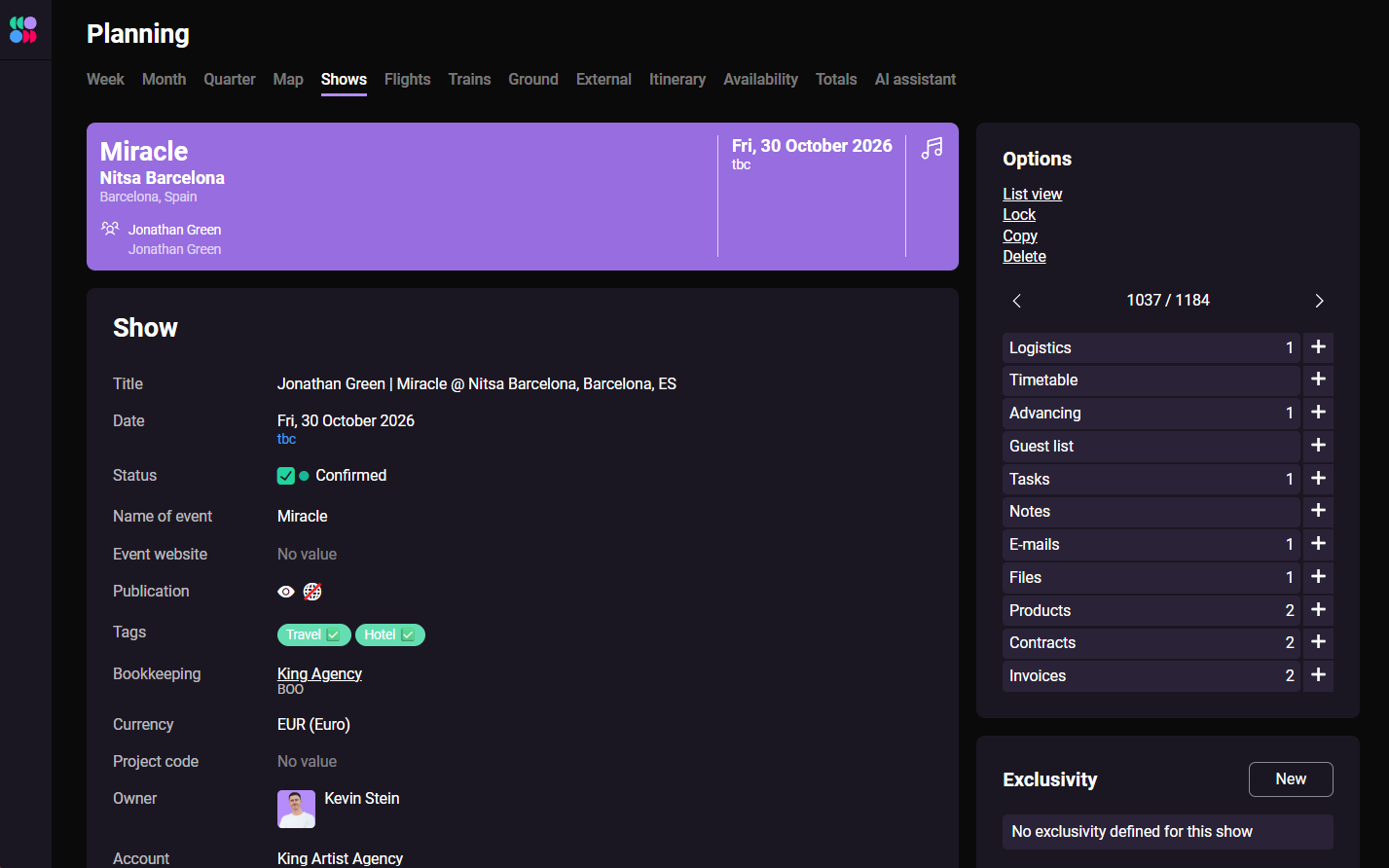
Purple headers
We’ve introduced clear, purple headers that summarize the most important information in various places, including show details, the address book, and travel appointments. These headers help users find key information at a glance.
You might already recognize these headers from our new mobile app. Bringing them to the desktop platform helps create a more consistent experience across both.
Form elements
We’ve also given the various form inputs in SystemOne a subtle visual refresh. Cleaner, more contemporary look and feel.
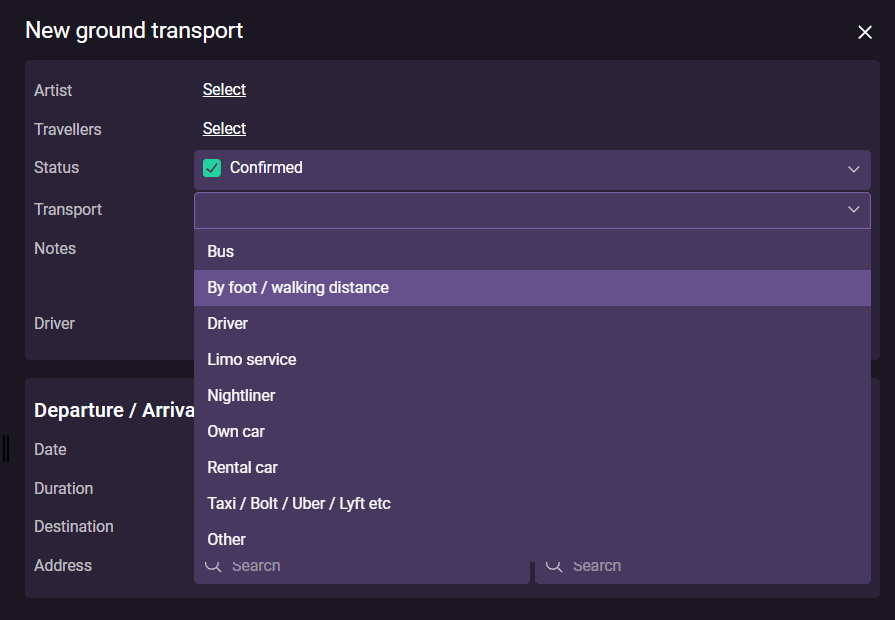
Sometimes, walking is just as fast as driving, or even faster! Especially in high-traffic areas. To help logistics managers provide the most convenient and reliable itinerary for their artists, we’ve added a new “By foot / walking distance” option to ground transport.
Google Maps integration
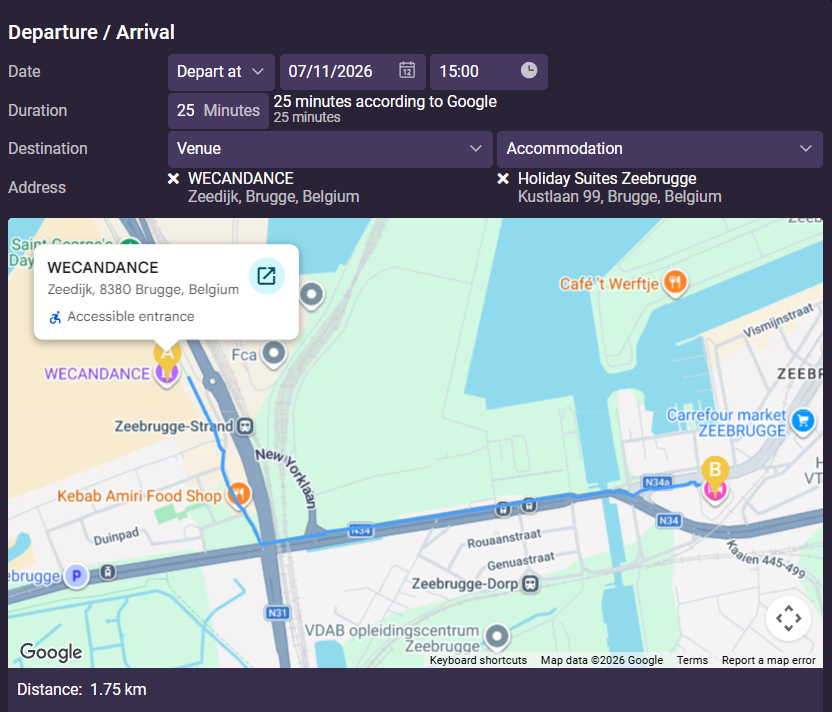
When you click “By foot / walking distance,” Google Maps automatically calculates the walking route, distance, and estimated travel time.
As the days get shorter and darker (in the Northern hemisphere), we’re spending more time indoors—adding new features to our mobile app to make it even more useful for agents and artists :)
Add & modify tours
A welcome addition for agencies using our tours feature: you can now add and modify tours directly from the mobile app.
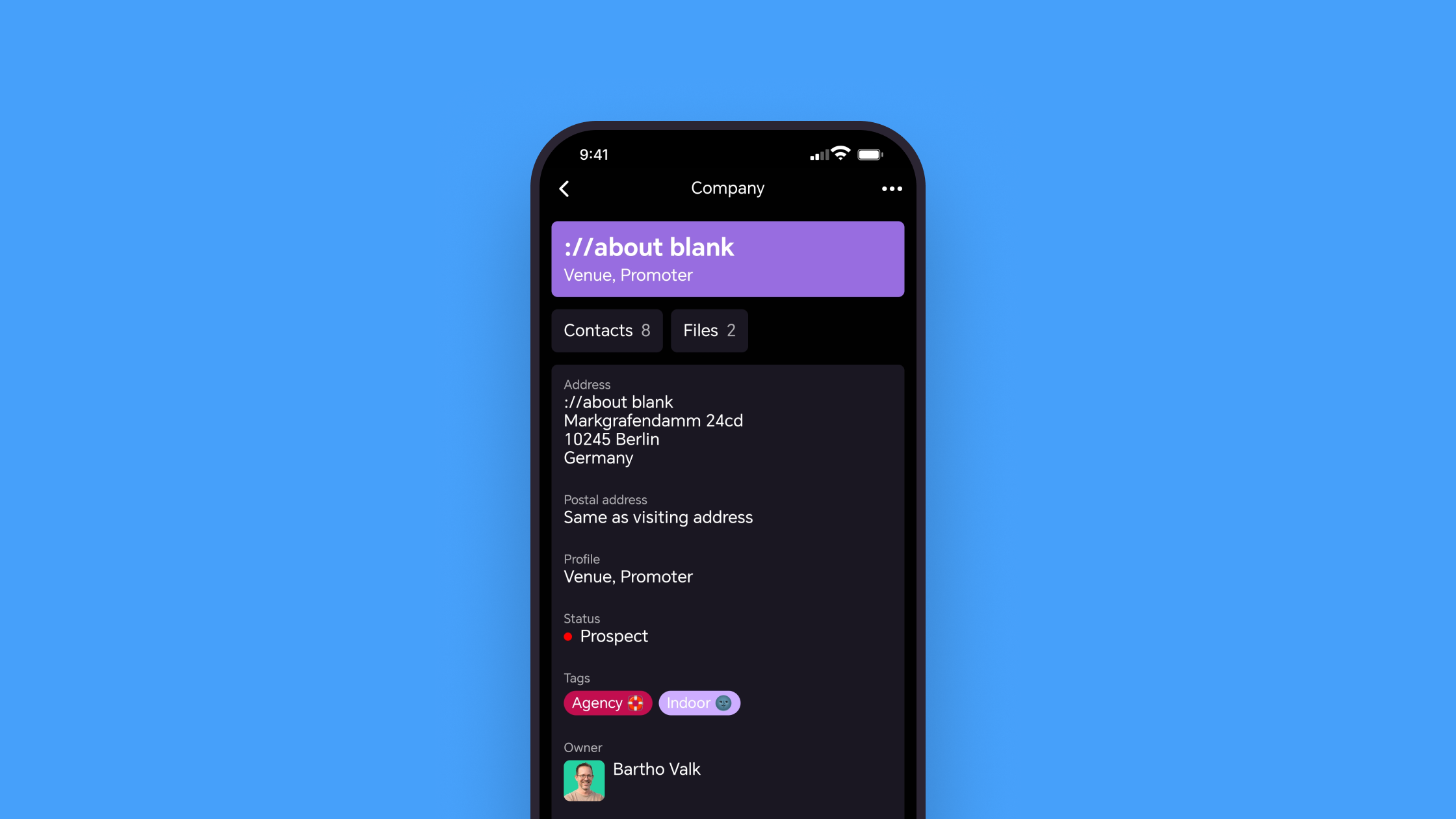
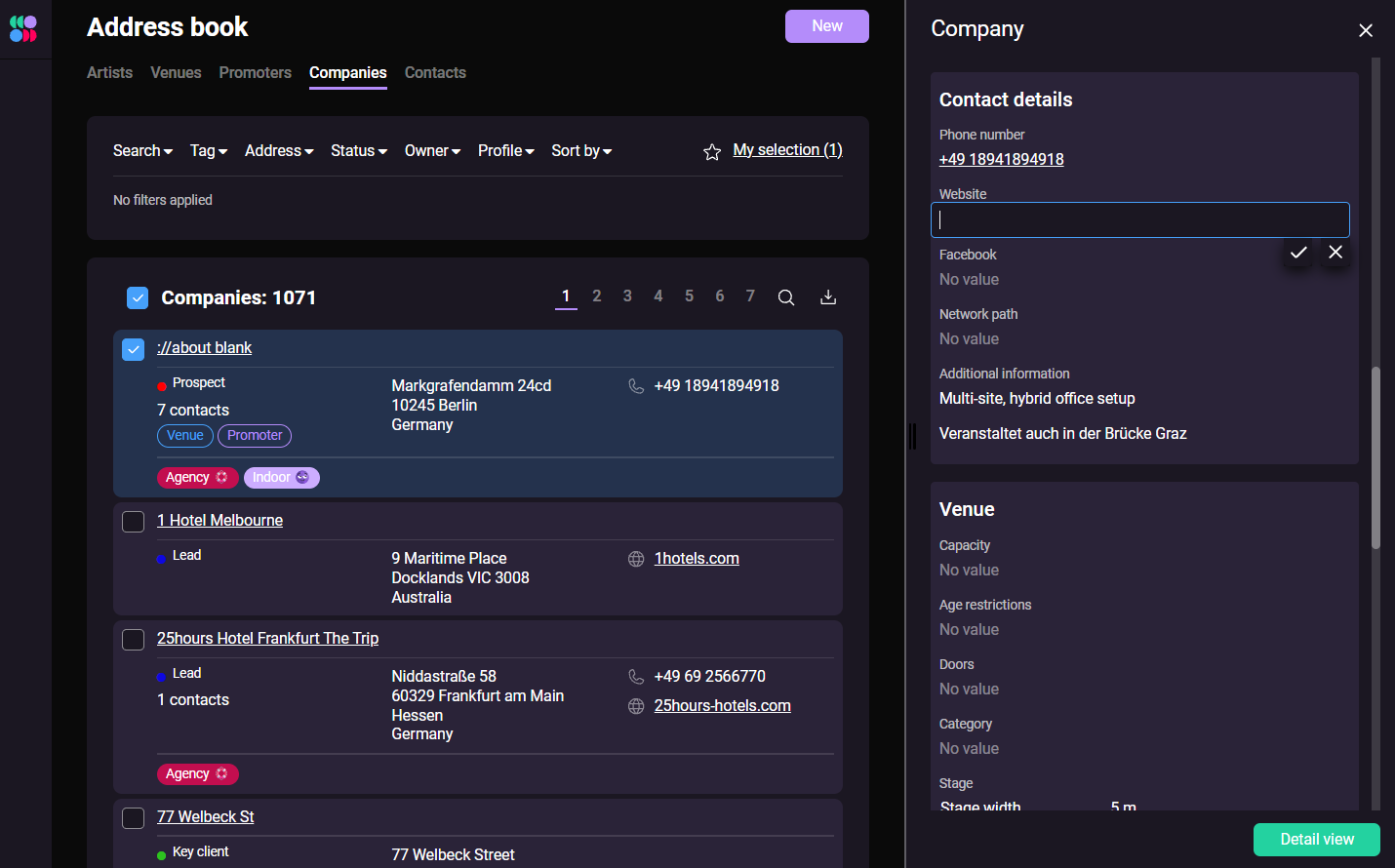
Add & modify companies
We’ve expanded the address book functionality so you can now add new companies and edit all the details of existing ones.
Tickets in show details
We’ve added a tickets panel to the show details view, allowing you to view and update information such as a show’s sold-out status.
The panel is only visible when the tickets feature is enabled in your system configuration.
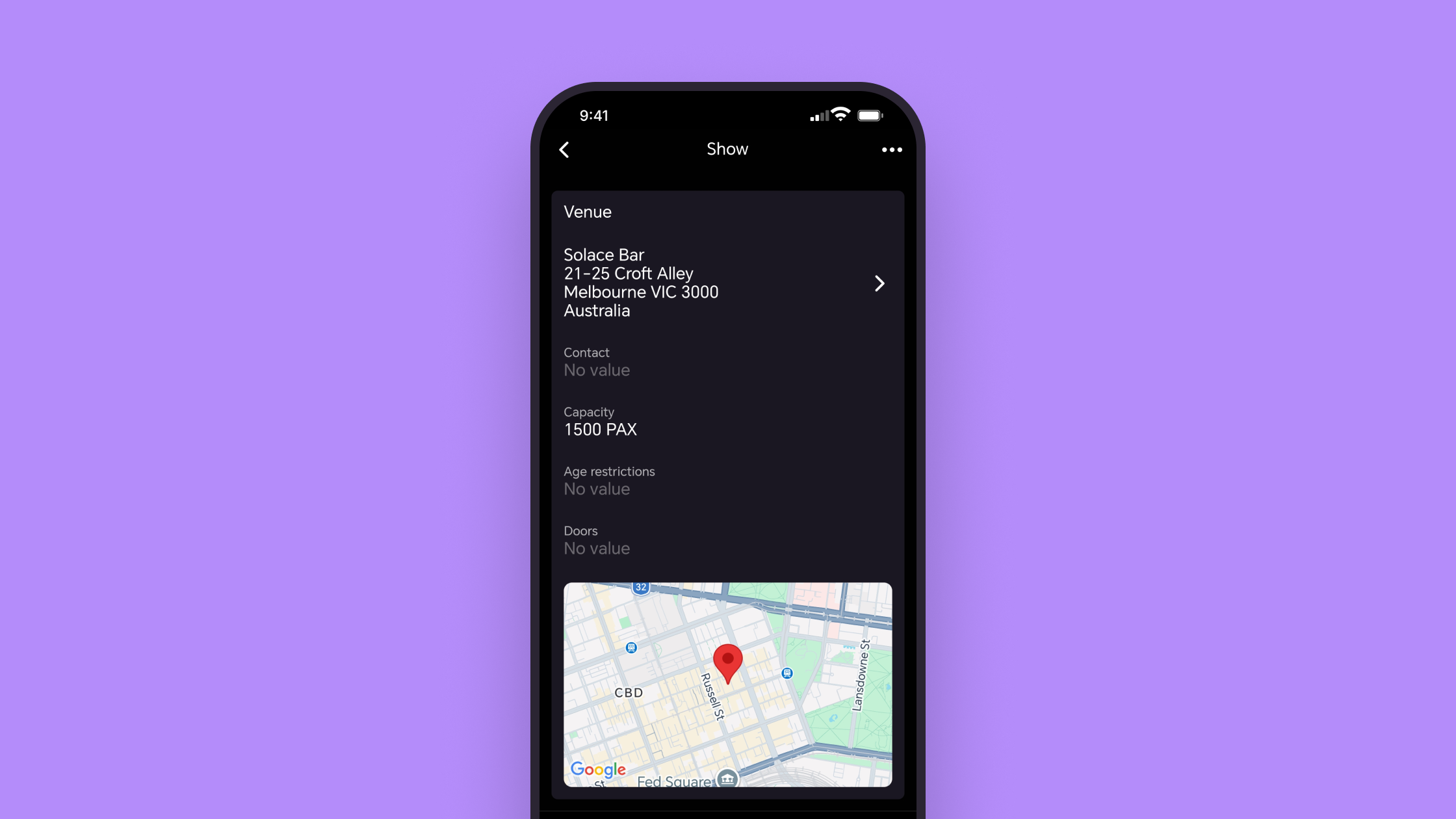
Map in show details
We’ve made life easier for artists on their way to shows by adding more venue information to the show details view, including a handy map.
Restore deleted companies & contacts
You can now restore deleted companies and contacts directly from the mobile app.
Bug fixes
We’ve improved the authentication process to fix an issue that caused some users to be logged out unexpectedly.
Improving Peppol ID for Luxembourg
When you edit the details of a company registered in Luxembourg, you can now add its VAT or ID number for Peppol invoicing.
Companies in Luxembourg can be registered and found on the Peppol network either by their EU VAT number or matricule. The matricule is an 11-digit enterprise/company identification number.
Side panel design improvement
The design process of our new mobile app brought a lot of inspiration and learnings we’re keen to bring to the desktop app.
As part of a small styling improvement, we’ve grouped the sections within the side panel more clearly.
Mobile app updates
With our newest updates, the SystemOne mobile app became more useful for booking agents on the road:
Change file names
The new app makes it easier for all users to upload and share different types of images and documents related to companies, contacts, shows, flights, train travel, etc.
Sometimes these uploaded files have arbitrary names, which can make it difficult to sift through when you need to quickly find boarding passes and travel information.
You can now rename them immediately in the mobile app.
Add & modify contacts
Users with permission to modify the address book can now add new contacts and change all the details of existing contacts.
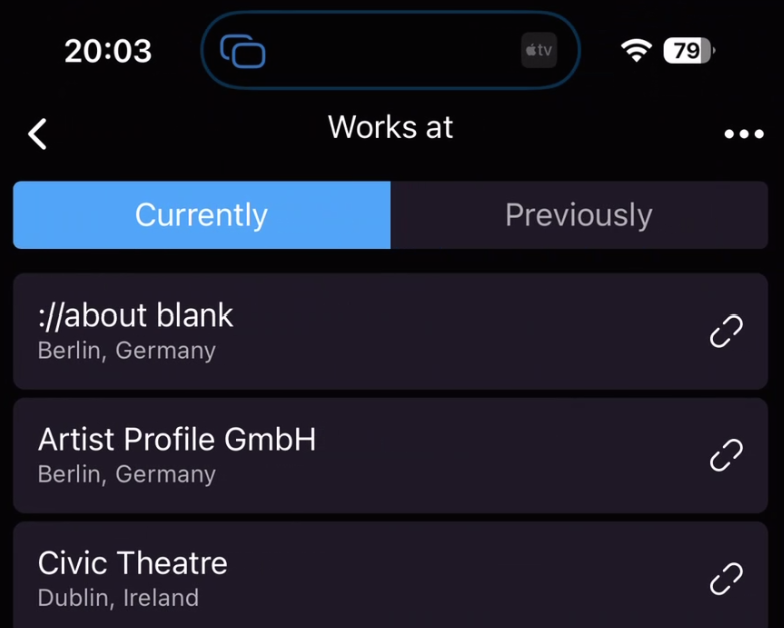
Contact works at
We added a new “Works at” tab in the contact view to list the companies a contact works for or used to work for. Handy for quick contact details or if you’re struggling to get a hold of someone.
You can link new companies and change the existing relationships, just like in the desktop app.
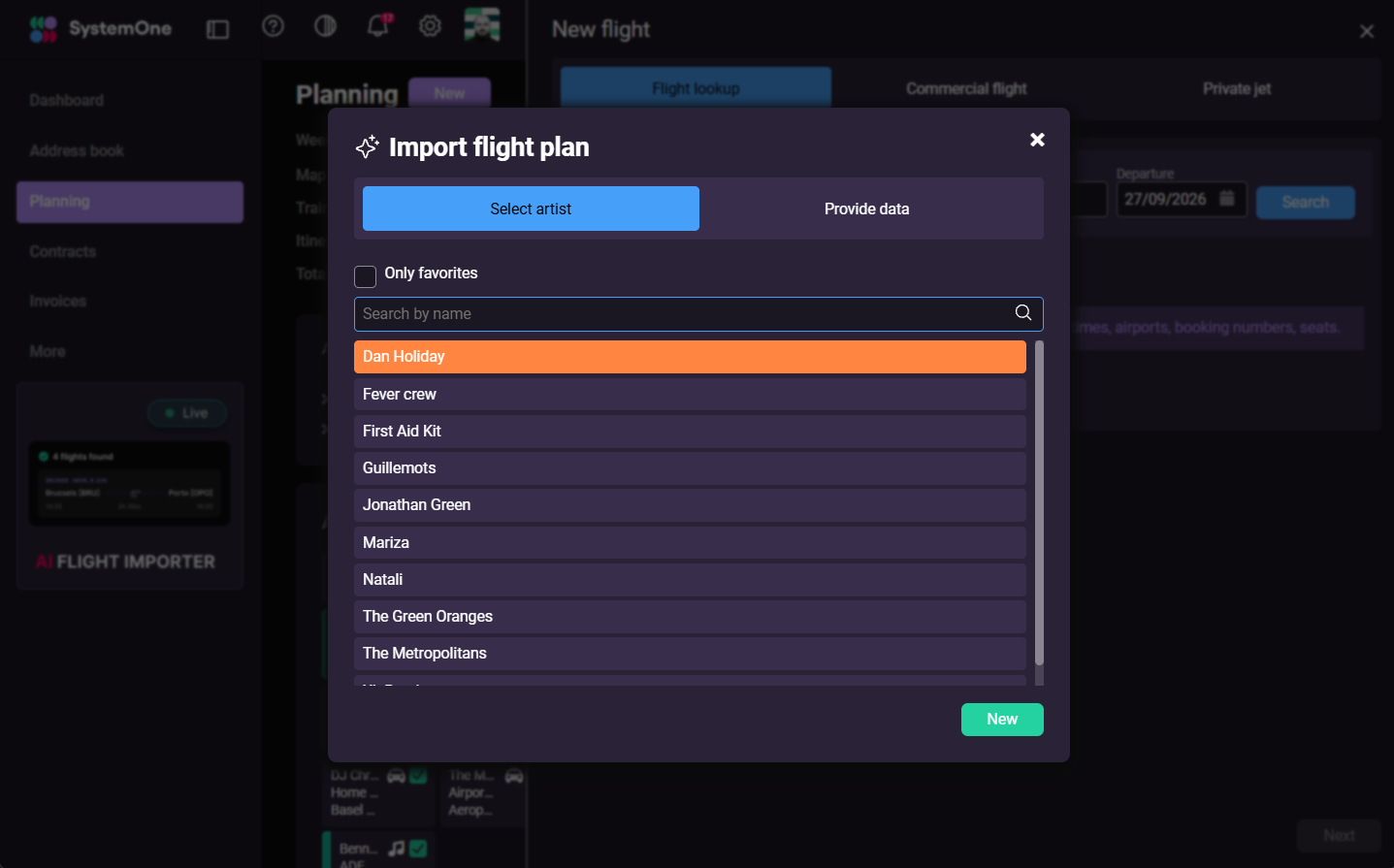
With our new AI flight importer, we’ve reinvented the way manual flight entry on SystemOne works.
In 2025, over 50K flights were added manually to SystemOne by our collective user base. These are confirmed flights for artists, booked by the agency or promoter themselves or through a travel agency.
On average, it took users 6-7 minutes to enter each flight into SystemOne with passenger details, baggage allowance, and other information.
You can now simply upload a flight itinerary as a PDF or screenshot, and our tool does the heavy lifting. Within seconds, all flight data is processed and ready for you to review.
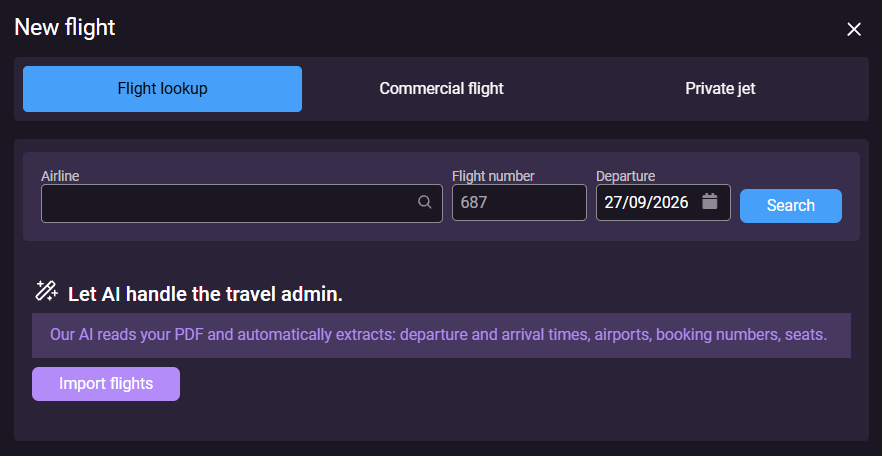
Useful AI?
AI is finding its way into just about every software product, and we believe it should only be there when it provides a clear benefit to the people using it.
This was our starting point when building the AI flight importer: use AI for something it’s genuinely good at and save our users a meaningful amount of time.
The result goes well beyond basic information extraction from a flight itinerary. The AI importer is deeply integrated with the data already in your SystemOne account.
For example, passengers are automatically matched with contacts in your address book, so much of the work that previously had to be done manually is taken care of for you ✨
Credits
You’ll be charged credits for each successfully imported flight. We deduct these from your SystemOne credit balance.
We expect that only heavy users will need to purchase additional credits on top of their free credits received upon renewal. And even then, the time saved by importing flights instead of entering them manually should significantly outweigh the cost to your agency.
Want to see Kevin explain the feature? Hit play below:
SystemOne has introduced a new way to charge for using certain services, such as the new AI flight importer and sending invoices via the Peppol network.
Each action uses a number of credits, which are deducted from your credit balance. Since these services also generate direct costs for SystemOne, this credit system only charges the customers who actually use and benefit from these features.
Free credits
We want everyone to be able to try our new features without additional costs. That’s why every customer gets free credits with each subscription renewal.
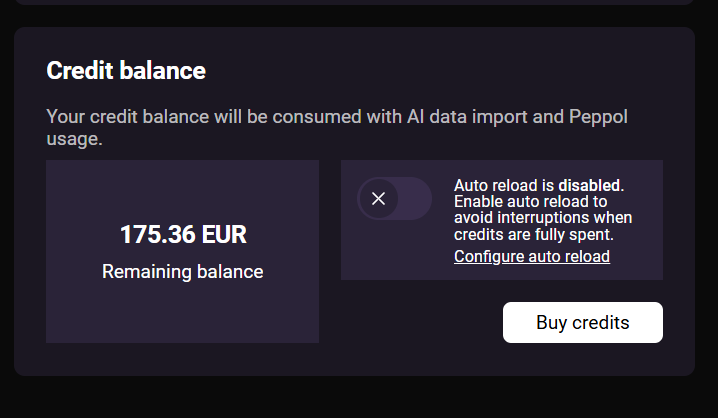
Credit balance
You can check your credit balance under system settings. Here you can view your remaining balance and buy additional credits when needed.
Buying credits
If you’re a heavy user and run out of credits, you can top up your balance. The amount will be charged to the payment method we have on file.
You can buy credits as a one-time purchase or enable auto reload. With auto reload, credits are automatically added when your balance drops below an amount you set, so you don’t have to worry about running out and topping up.
Credits are valid for 12 months and are non-refundable and non-transferable.
Credit transaction history
Under system settings > general, you can find an overview of all transactions that affected your credit balance.
Device-specific activity logs
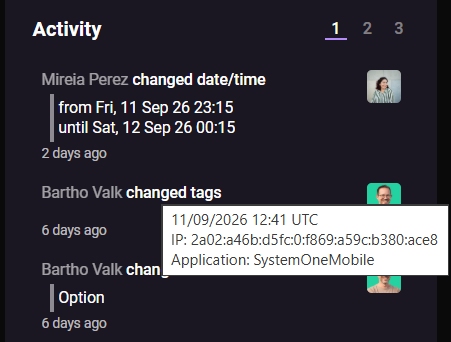
We’ve implemented a new feature so all activity logs will keep track of where users made changes—either the SystemOne web platform (desktop) or the mobile app (mobile).
Our new mobile app now enables users to make changes in SystemOne, like updating shows. With these new possibilities, we thought it would be useful to see the updates in activity logs when changes were made.
Danish invoice template translation
We’ve implemented a full Danish translation for the InvoiceV2 template. Flot!
Big news! We’ve just launched the completely new SystemOne mobile app, rebuilt from the ground up.
Agents and agency teams spend less time behind their desks and more time working on the go.
Whether you’re traveling, at a venue or festival, or away from your computer, we want SystemOne to be just as easy to use from your phone.
The previous version of our mobile app was primarily designed for artists and crew. With the new app, we’re taking a big step forward. Alongside everything artists already need, we’ve added a range of new features specifically for agents and their assistants.
The SystemOne mobile app has a completely redesigned interface, improved navigation and a smoother, more modern mobile experience—while keeping the simplicity and ease of use that you love SystemOne for.
Check out Kevin's breakdown:
All artists in one calendar view
We frequently received requests from agents that they would love to see all shows for their complete roster in one mobile view. That’s why we redesigned the calendar.
The new mobile calendar view combines a monthly overview for quick navigation with a detailed list of all shows and travel items. Extensive filtering options make it easy to drill down on the artists, bookings or travel details that you need.
More filter options
The improved filter tool enables you to narrow down the info and make informed decisions quickly. You can filter by:
- By type
Display a certain type of appointment (e.g. show, flight, ground transport, train journey, external calendars). - By artist
View appointments for specific artists only. - By status
Filter on confirmed, optional or cancelled items.
Change show details
Users with editing permissions can now update show information directly in the app. Last-minute changes to set times, dates, drivers, and other details are part of the game, and now you can handle them on the road.
Add new shows
A real game changer for agents: you can add a new booking option directly in the mobile app. Enter new deals as they come in, even when you’re backstage at a festival or traveling to the next show.
Access to the full address book
Internal users can now access the full address book, including all the company & contact information directly from their mobile phone.
Upload & share files
Sharing files for shows, venues, and promoters is now a thumb-flick away. Upload riders, boarding passes, parking tickets, or other documents directly in the app and make them instantly available to artists and crew.
Dark & light mode
As part of the new design, the app now supports both dark and light mode. By default, it follows your phone’s system theme, but you can easily switch between modes in the settings under your profile.
More to come!
There’s more to come. Keep an eye on our changelog as we continue to expand the mobile app with new features and improvements for agency teams, artists, and crew in the months ahead.
Get the new mobile apps:
We’re working on a huuuge project and are super excited to announce it very soon… but not yet! Our upcoming update might be one of the biggest ones yet, as it will close a few big loops when working with SystemOne.
For now, we’ll share two improvements that went live in July:
Improved “in the night of” setting
We simplified the “in the night of” UI element in shows and cleaned up the buttons with our new rounded square shape. This improves the overall look and feel of this feature.
We also fixed a minor issue with the “in the night of” setting related to ground transport.
More detailed activity logs
The activity log panel on the right now displays IP number when hovering over the card.
It also includes more information about the time of performance in the show activity log.
We’ve improved our Peppol verification process.
SystemOne now checks not only whether the invoice recipient is registered on the Peppol network (e.g. has an address), but also whether they can receive the required document type (e.g. what kind of ‘mail’ can be received at that address).
How it works:
Businesses can register on the Peppol network using a unique Peppol ID, such as 0088:123456789712.
A Peppol registration also specifies which document types a business can receive, like invoices, credit notes, order responses, and invoice responses. This info is stored in the receiver’s SMP record.
In most cases, businesses can receive invoices and credit notes. But some businesses have more complex configurations, with multiple Peppol IDs that don’t all support the same document types.
With this sprint’s update, the receiver’s selected document types are auto-checked by SystemOne so you know whether they’re able to receive it over Peppol.

We completed the rebuild of the train travel appointment type, keeping us “on track” with our modernization efforts ;)
The result is a more consistent UI for documenting the train journeys your artists take.
Quick changes
You can create and update trains in the side panel and edit fields directly, using in-page editing.
Less switching between screens and a more efficient workflow.

Mini schedule
The same compact calendar overview you see with every travel appointment is now in the right column of the train detail view.
It shows nearby appointments for the related artist, so you can plan with confidence and quickly spot appointment conflicts.

Activity panel
It’s easier to follow updates and avoid confusion. The detail view now includes an activity panel on the right-hand side that tracks the history of changes.
You can see what was modified, by whom, and when.
Learn more about our changes to the ground transport and air travel modules in SystemOne.

As part of ongoing improvements to our UI/UX, we’ve implemented full in-page editing for shows. You can update information right where you're viewing it, which is more intuitive and saves you clicks (and time).
Show detail view
We updated the show detail view and removed the edit button from the options panel on the right side.
Now, instead of taking you to another page to make edits, you can do in-page editing without leaving this page.
Side panel for shows
Anywhere you see a show within SystemOne, you can click it to open the information in a side panel on the right side of the screen.
Massive workflow improvement: you can now directly change values in the side panel for shows.

Activity panel in detail view
With the new activity panel in the detail view, you can track the history of all the activity in the show.

Ground transport by bus
We’ve added a new ground transport destination & transport type: buses!
Invoice to accounting software configuration
All invoices sent via the new InvoiceV2 feature are emailed to your accounting software's inbox.
Previously, multiple attachments of the same invoice in different formats were sent, but this led to duplicate imports in accounting software that imported all attachments instead of selecting the most suitable format.
We’ve added a new configuration feature in the bookkeeping page, so you can configure which files are attached. You now have these options:
- 1 attachment: Peppol Bis3 XML, fallback to EN16931 XML
- 1 attachment: EN16931 XML
- 1 attachment: PDF
- Multiple attachments: all formats (previous default)

Fresh new totals pages
As part of our ongoing modernization efforts, we’ve migrated the totals views for shows, quotes, contracts, purchase agreements, and invoices.
This update brings a significant performance improvement and refreshes the interface, making it consistent with the rest of the platform.
(Re)send to the Peppol network after issuing an invoice
We’ve introduced a new feature that lets you resend an invoice to the Peppol network after it has been issued.
Sometimes, the recipient registers on Peppol after you’ve already sent the invoice. There are a number of reasons for this, for example, there may be temporary issues with their Peppol registration.
To make this scenario easier to navigate, you can resend the invoice so it gets uploaded to the Peppol platform.

Right-click context menu
We’ve gradually introduced the panel on the right side of the screen over the past few years. This side panel enables you to preview, edit, and add information without leaving the page you’re working on.
Example: In the month view, you can click on a show appointment and immediately view all related information in the side panel.
While this is helpful for many, it was frustrating some users in their preferred way of working—especially those who want to navigate directly to the detail view or open details in a new tab.
With these power users in mind, we’ve now introduced a right-click context menu that gives you all of these options, and more, so you can work faster.

External calendar migration
Users can retrieve appointments from external calendar sources via Google Calendar or subscribe to an iCalendar data source.
We’ve migrated the different views where you can subscribe to calendars and display external events to a more updated technology.
We also squashed a few bugs and made the interface a bit sleeker in the process.
Bug fixes
- Sometimes, the PDF generated for InvoiceV2 showed up as a blank page. We’ve fixed that issue.

When an InvoiceV2 is sent, several processes run in the background, including:
- Generating the PDF and XML files
- Sending them to your accounting software
- Connecting with the Peppol network
We’ve completely redesigned these background processes, so failed steps are automatically retried.
This makes invoicing more resilient, more reliable, and less prone to disruption by temporary issues such as network interruptions.

EN16931 is the European standard for electronic invoicing. It defines which information an e-invoice must contain, how details such as VAT, totals, and customer information should be structured, and how that data should be formatted so other systems can read it correctly.
We have improved the mail-to-accounting-software-inbox feature in InvoiceV2 by adding this XML file to the email sent to your accounting software.
From now on, these mails include:
- PDF version of your invoice
- EN16931 (UBL) XML file
- Peppol BIS 3.0 XML file (if the invoice is sent over Peppol)
With this improvement, SystemOne is now also EN16931 compliant.
This increases compatibility with external applications and accounting systems, which is highly relevant to customers who consider developing a custom integration.

It’s a big year for tour management in SystemOne!
As part of our major migration project, we’ve modernized the flight module and taken the opportunity to restructure the underlying data model. The result is a more logical data handling and a better foundation for future integrations.
Passenger details in the right place
Before this update, e-ticket numbers and seat assignments were stored at flight level. When multiple passengers were linked to the same flight, it was not always clear which details belonged to whom.
With the new structure, these details are now stored per passenger, which is much more logical and easier to work with.
Meal & baggage
You can now track meal information and baggage restrictions at passenger level.

Upload files per passenger
Instead of uploading files per flight, you can now upload files for each individual passenger.
Simplified structure
Previously, a single flight booking could contain multiple segments. While that had some advantages, it also made the interface more complex and created friction for integrations with other systems—including the new SystemOne mobile app we’re currently building.
The updated structure is simpler and better suited for future development.
In-page editing
When you work with flights—whether in the side panel or on the detail page—you can now edit fields directly.
This means less switching between screens and a more efficient workflow.
Activity panel
The detail view now includes an activity panel that tracks the history of changes. You can see what was modified and when, making it easier to follow updates and avoid confusion.
Mini schedule
We’ve added a compact calendar overview in the right column of the flight detail view. It shows nearby appointments for the related artist around the flight, so you can quickly spot conflicts and plan with confidence.
In-page editing on quotes, contracts & purchase agreements in the “classic workflow”

We completely rebuilt the screens for creating and editing quotes, contracts, and purchase agreements in the classic workflow (or V1). The detail screen now also supports in-page editing, so you can update information directly without jumping through extra steps.
These changes make the classic workflow for document handling more intuitive, faster, and up-to-date.
Recap: what's the classic workflow?
In 2023, we released an upgraded experience with eSign for quotes, contracts, and purchase agreements, replacing the original document functionality. To prevent confusion, we now refer to those original documents as the “classic workflow.”
The classic workflow was built on legacy technology, and as it’s still in use by a few of our customers, modernizing it became part of our upgrade effort.

Many agencies create the same set of tasks for every show. With default tasks, you can set these up once and have them added automatically whenever a new show is created.
You can manage default tasks in system settings in a dedicated admin module. For each task, you can define the deadline relative to the show date, for example, 14 days before or 2 days after the show.

We’ve given ground transport a major facelift and rebuilt it with the latest technology. Instead of an overlay with multiple tabs, you can now create and edit ground transport in a sleek side panel that opens on the right.
Transport type
A new Transport type field lets you specify the mode of transportation, like a tour bus, limo, or taxi.
In-page editing
Wherever you work with ground transport—in the side panel or on the detail page—you can now edit fields directly. No more jumping between screens and disrupting your flow.
Activity panel
The detail view now includes an activity panel that tracks the history of changes. You can see what was modified and when, making it easier to follow updates and avoid confusion.

Mini schedule
We’ve added a compact calendar overview in the right column of the ground transport detail view.
It shows nearby appointments for the related artist around the transport date, so you can quickly spot conflicts and plan with confidence.

iCalendar feed detail & help interface update
Agencies can share artist calendars with users via iCalendar feeds. We rebuilt several pages in the app where users can access and configure these feeds as part of our ongoing refactoring efforts: upgrading the underlying technology and incorporating improvements based on user feedback.
The new iCalendar feed detail and configuration page now supports in-page editing and offers a smoother overall experience.
Default language for new contacts
You can now configure the default language for new contacts in personal settings > defaults for new items.
Added Global Location Number (GLN) to company details
A Global Location Number (GLN) is a 13-digit GS1 identifier used to uniquely identify companies (legal entities). For eInvoicing (like Peppol), it can serve as an electronic address so systems can route invoices reliably to the right receiver.
We’ve added this field to the company details section, so you can add it to a company that identify themselves with a GLN on the Peppol network.

Improving Peppol lookup for Belgian companies
We improved our recipient lookup so Belgian companies can be found by enterprise number as well as VAT number.
According to Peppol best practice guidelines, Belgian companies should register using their enterprise number so they can be found as eInvoice recipients. Optionally, an alias can be added to enable lookup by VAT number as well. In rare cases, Belgian companies are registered using only their VAT number.

Company details now include Peppol findability
This feature is relevant for customers with a Belgian bookkeeping setup.
We’ve added Peppol information to the financial details panel on the company detail page.
You can now more easily see whether a company is on the Peppol network.
Previously, this was only visible later in the invoicing flow.
Bug fixes
We’ve fixed some minor issues related to the recent InvoiceV1 migration release.

This is the big kahuna that we’ve been working on for months. We’ve built a replacement for the current invoice module on SystemOne, aka InvoiceV1 or Classic workflow.
A noticeable difference is that there are 4 clear life cycles: draft, review, outstanding, and settled. This new, structured approach in InvoiceV2 is more resilient from an accounting perspective and opens the door to exciting new features like digital invoicing (Peppol) and automatic reminders.
The new V2 version looks familiar if you’ve used InvoiceV1 and eSign, so we expect you can find your way around it easily. But if you need a bit of help, feel free to reach out to us at support@systemonesoftware.com.
Let’s go through some of the big updates you’ll enjoy from now on using InvoiceV2:
100% Peppol compliant
Digital invoicing or eInvoicing is a big theme in many countries. From 1 January 2026, businesses in Belgium need to send their invoices digitally over a shared network called Peppol. If you see your country on this list, you’re likely already required to do this or will soon be.
We’ve gone to great lengths to build a workflow that seamlessly integrates SystemOne with Peppol, so our customers don’t need an external solution to submit their invoices and credit notes.
The big win for you is that you can keep working and doing everything in One System, without having to adopt another software ;)
We’ve onboarded most of our clients in Belgium onto the new workflow, so we’re ready for the new year.
The next big focus will be on eRechnung in Germany and helping our German customers become eInvoicing compliant in 2026.
Standardized templates
Invoices are now generated as PDFs. You can customize the template in your bookkeeping with your logo and header & footer.
The driving factor behind this change is standardization and eInvoice compliance.
Previously, the customized Word templates were unstructured, which meant information could get lost in any digital exchange—not eInvoice-friendly!

PO number
Government and larger corporations often need a reference to their purchase order (PO) on their invoice. Without this buyer reference, they can’t accept your invoice.
We’ve introduced a new field in InvoiceV2 to store this information. It will automatically appear on the invoice PDF.
The reference is relevant when you’re submitting to the Peppol network. We made sure it’s included in the right place on the invoice.
Automatic reminders
One of the major improvements in InvoiceV2 is the automatic reminder feature for outstanding invoices, as part of your dunning process.
Users can configure default settings for the reminder intervals and control when emails are sent. SystemOne provides default email templates out of the box, and users can customize this content to match their own tone and preferences.
On a per-invoice basis, users can also change scheduled reminders, for example, when working with a trusted partner.
Activity panel in invoice detail view
With this new panel in the detail view, we track the history of everything that happened to the invoice.
You can see what was changed, when, and by whom.
Automatically email invoice to accounting software
A frequently requested feature was to have every InvoiceV2 mailed to the customer’s accounting software.
This can be activated by configuring the email address of your accounting software on the bookkeeping detail page.
The email includes the Invoice PDF and a UBL XML file that has invoice data in a structured format.

In December we made a few quality-of-life updates, but our biggest achievement was launching InvoiceV2 beta.
Activity log: changes to notes
An activity log is now created each time someone adds, updates, or deletes a note with a company, contact, show, eSign contract, or InvoiceV2 invoice.
Duplicate product lines
A small improvement that might save you a lot of time: a feature to duplicate a product line so you can use it as a template for different pricing or items.

We’re busily working on InvoiceV2 behind the screens, which will bring cool new features soon. To avoid confusion, we refer to the existing invoicing as “InvoiceV1” or the “classic workflow.”
InvoiceV1 was built with legacy technology. We’ve completely rebuilt all the screens for making and editing invoices to make them more intuitive and up to date.
The invoice detail screen also now allows in-page editing.