
How to eSign artist booking contracts
Still emailing PDFs and manually following up with promoters? Here's how to eSign artist booking contracts in minutes using SystemOne.

Niels van Loo
Quentin Van Damme
Eddy Kruse
Martin Königsmann


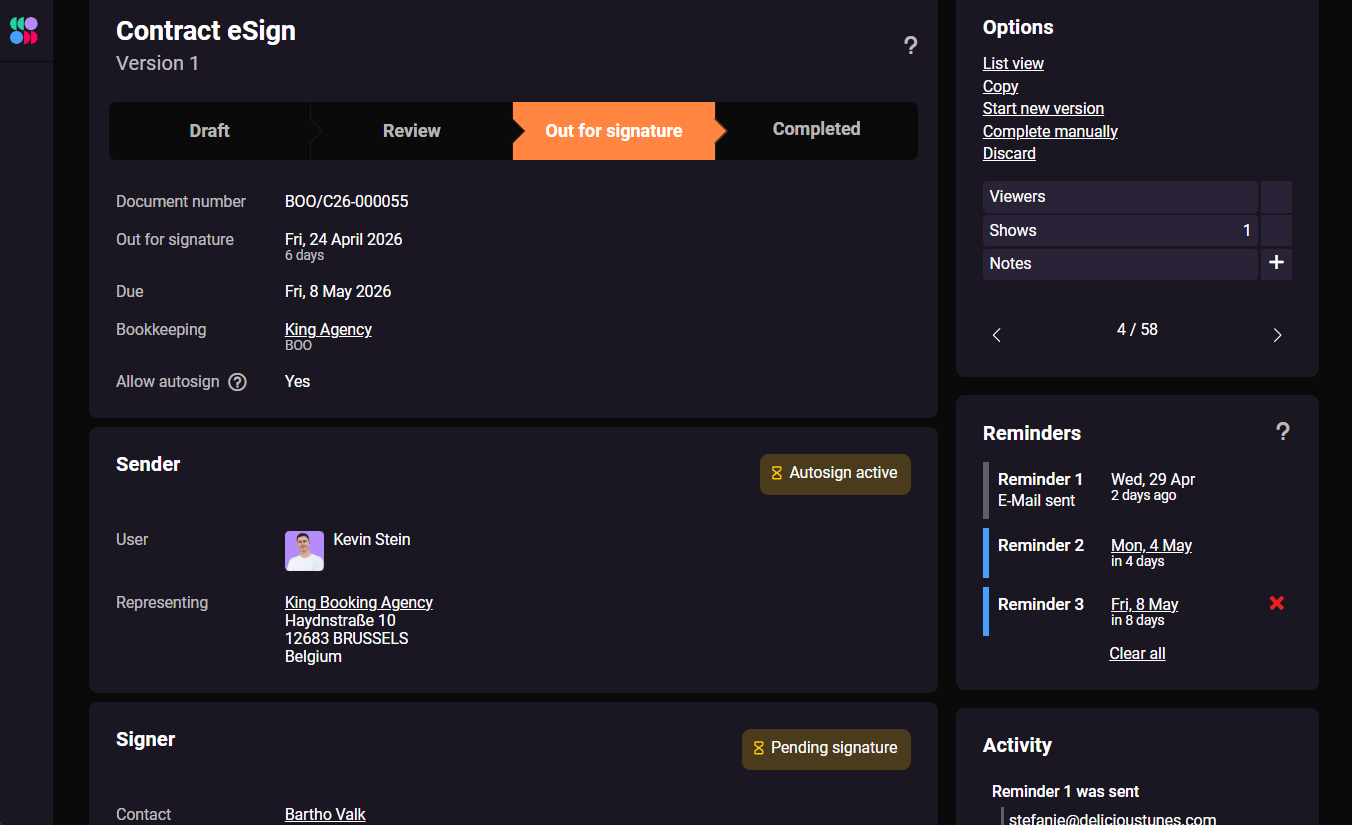
If you ask industry veterans how they used to secure bookings, you'll hear horror stories about waiting days for a piece of paper to slowly work its way through a fax machine. OK, maybe it wasn't that bad, but Martin Königsmann of MGNFY recalls the early days of his career:
{{martin-mgnfy-5}}
Today, the speed of the music industry demands instant results. If you're still generating PDFs, emailing them to promoters, and waiting for them to print, sign, scan, and email them back, you're losing valuable time—and possibly the booking.
SystemOne's built-in eSign feature is widely considered one of its standout tools, transforming how booking agents close deals. Here's a step-by-step guide to using it.
1. Start with accurate data and custom templates
eSign works best when contract generation is automated from the start. Instead of manually typing up terms for every deal, direct promoters to a customized booking request form that feeds directly into your SystemOne account.
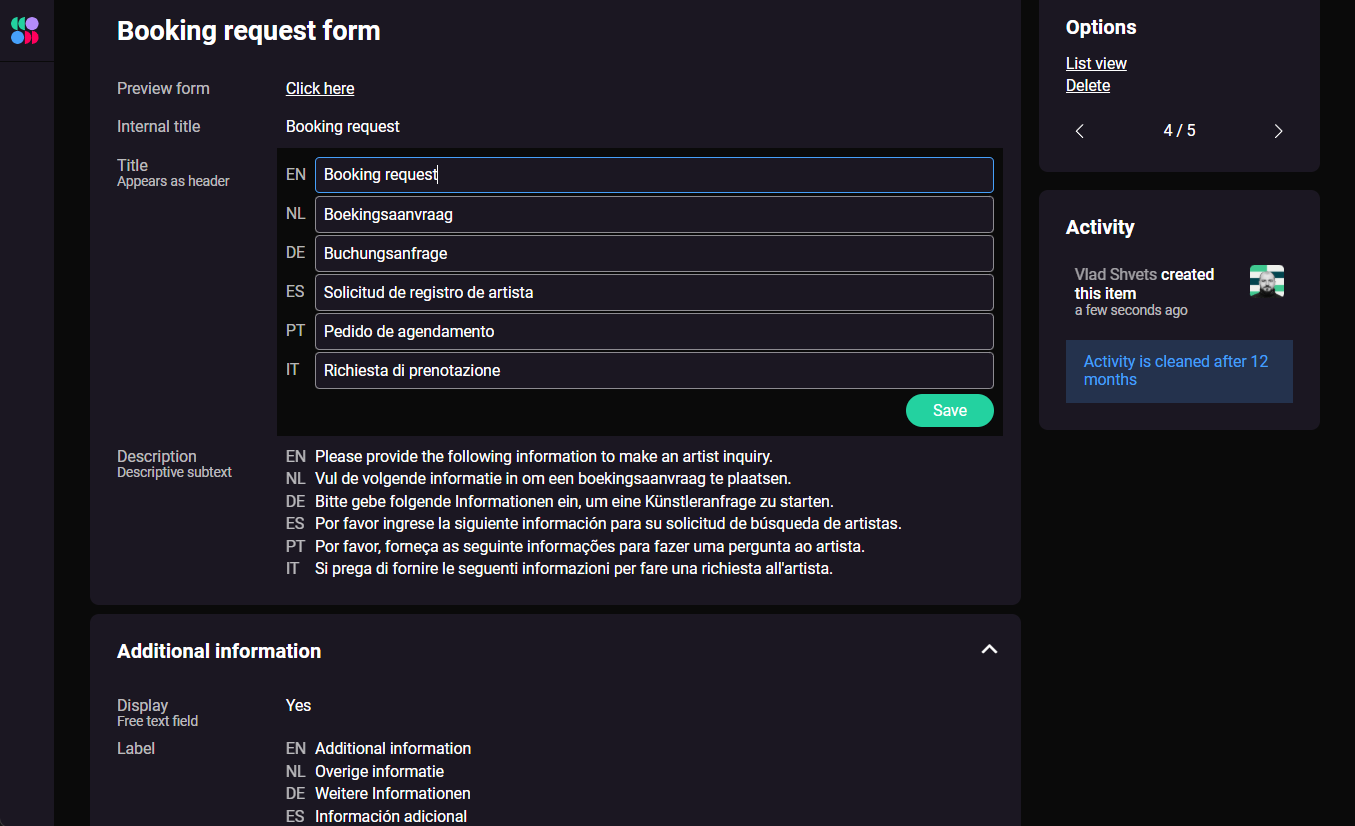
Once the booking request is in the system, you can generate contracts using custom templates. You can find your custom templates by navigating to Settings > Template settings.
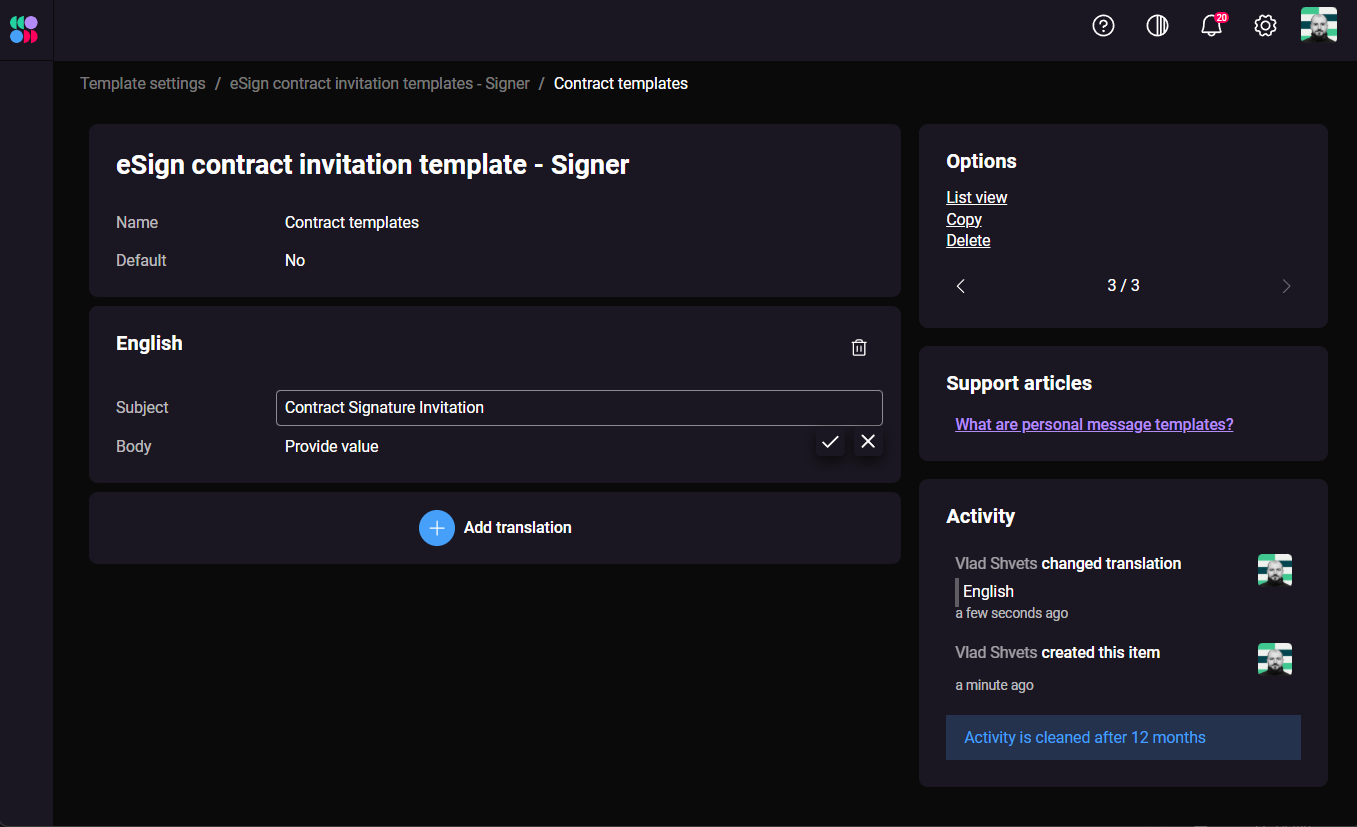
Eddy Kruse, Co-CEO of Tote Sonne, explains that his agency uses tailored templates to ensure all mandatory fields, deadlines, and specific stage design details are automatically transferred into the deal memo and contract. This eliminates manual data-entry errors and means the final document is ready to sign the moment it's generated.
{{eddy-tote-sonne-3}}
SystemOne supports multiple contract templates, so you can maintain separate versions for different types of shows—club tours, festivals, corporate events—without starting from scratch each time.
2. Attach the artist rider directly to the contract
A contract signature is necessary, but what if the promoter doesn't see and approve the technical and hospitality requirements? To ensure they get all the info at once, agents use SystemOne to bundle the artist rider directly into the eSign workflow.
Niels van Loo from Parachute Booking explains his approach:
{{niels-parachute-13}}
By combining the documents into one digital signing process, the promoter legally commits to the rider's contents at the same time as the contract—no separate follow-up required.
Not sure what to include in an artist rider? Check out our full artist rider guide.
3. Ditch multiple PDFs & send one eSign link
Once your template is populated and your rider is attached, you can bypass messy email attachments entirely.
Eddy notes that eSign completely changed his workflow.
{{eddy-tote-sonne-7}}
Instead of a bulky email, the promoter receives a single link to review and sign a single document online.
The result? Unmatched speed.
{{eddy-tote-sonne-1}}
Eddy adds that this is "three up to five times" faster than alternative methods.
SystemOne generates a secure, unique signing link for each document. The promoter doesn't need an account—they just open the link, review the document, and sign. Once they do, both parties get a confirmation automatically.
4. Automate the follow-ups
Sending the contract is only half the job. Chasing the promoter for their signature and deposit is usually where agents lose the most time. SystemOne removes this burden through automated tracking and reminders.
Quentin Van Damme of Ground Control Agency highlights this as one of his favorite features.
{{quentin-gca-7}}
By setting up these automations, SystemOne handles the tedious task of reminding promoters to sign the contract and pay their invoices—freeing you up to focus on securing the next booking.
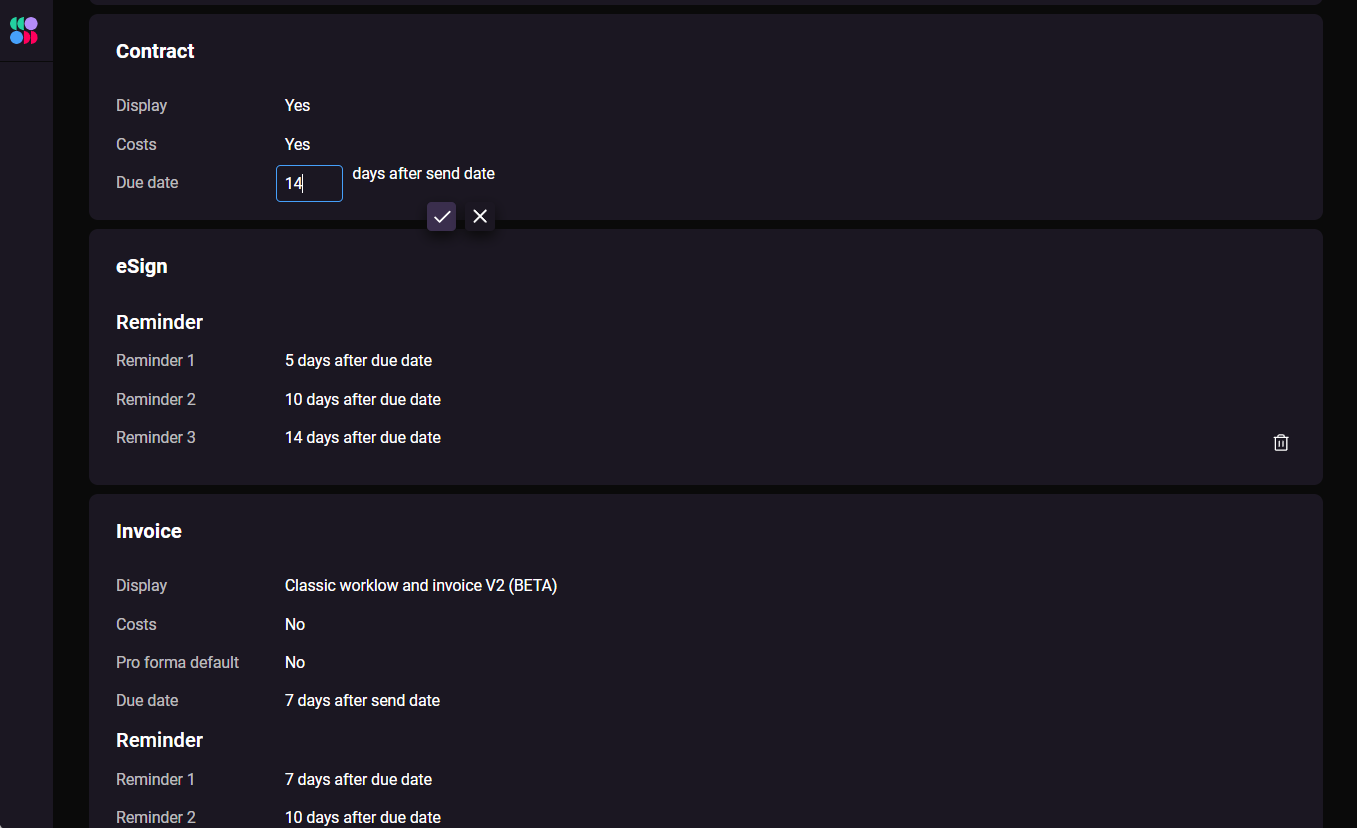
You can track the status of every outstanding document from one view: whether it's been sent, opened, signed, or is still waiting. No more chasing emails or digging through inboxes to find the latest version of a contract.
Why eSign matters for your booking agency
SystemOne's eSign saves you a lot of paper, but that's not the biggest deal about this feature. The bottom line is that it accelerates your booking workflow, enabling you to lock in deals and get artists paid on time.
With SystemOne's custom templates, integrated riders, and automated reminders, you can cut your administrative workload down to almost nothing and finalize bookings in a matter of minutes. Whether you're a solo booking agent or running an international agency team, the time saving adds up fast.
If you want to see SystemOne's full feature set, book a demo with our team, or request a free trial and set up your first contract today.
"Back then in 1999 I sent contracts via the fax machine—we would wait for when the documents would come back signed and each time print physical copies. So this took me heaps of time."

“We have an optimized version of SystemOne for Tote Sonne, but we were also able to customize it based on our agency’s changing needs. The ability to customize templates for every artist is something not available with any other booking software.”

"In SystemOne, I can add the rider to the end of the contract and make sure the right people not only read it but sign it."

"We're using the eSigning process for contracting—we're not using any PDFs anymore basically, which is quite helpful and makes things easy."
“We save 3X to 5X more time managing bookings with SystemOne compared to using other booking software. We don’t use PDFs or written documents anymore—it’s all done on SystemOne.”
"We've scheduled for automatic reminders after 7 days and then a second reminder after 14 days and a third reminder after 21 days. I'm looking on the sideline and seeing SystemOne doing most of the follow-up work."


Recent articles

.png)

Never miss an update


